
Self-publishing advisory: formatting

So, you have written the book. You have either self-edited or you have sent it for professional editing. You have made the alterations and corrections, and now … now you are ready to format your precious for publication.

formatting-word-cloud21


First off, this is not a step by step guide to how to format your beloved book. There are more that enough guides on doing that. As with my other posts, this will be about things I have learned as I have gone through the mill of setting up my books for sale on Amazon, Smashwords and as a ‘print on demand’ book.

Secondly, I will add a caveat, a warning. There are a lot of companies out there who will offer to format your books for you, and many of them come under a thinly veiled disguise. A bit of digging will show them to be a vanity publisher. They offer to format, and then they offer to publish. Self-publishing via the Amazon Kindle Direct option or via Smashwords costs nothing, other than the cost of having a decent front cover. That is the only thing on you should need to expend money.

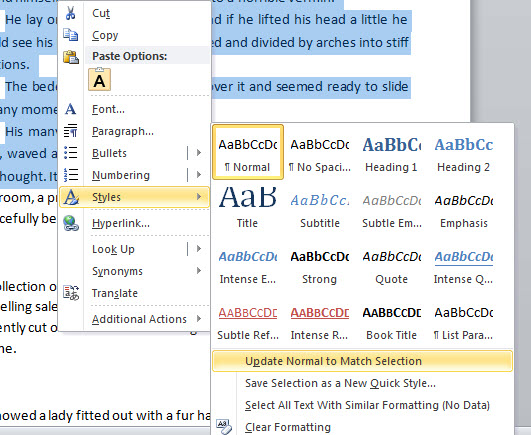
So, why do I reckon it is so straightforward. If you look at this illustration, you might well think, “Noooo! I can’t face this …”. But it is possible. It just takes a bit of planning. I am going to make the assumption that you are using Microsoft Word. Not everyone does, but the majority do.
3-18-2014-10-09-26-AM

That picture looks scary, but it is not. The basics that you need are a style for your main body text, usual ‘Normal’ and one for chapter titles, for which you can use something like the one shown in the picture as ‘Book Title’. Everything else can be based on those two titles. It really can be that simple.

The key thing is that if you use those pre-set styles, you can fiddle with the fonts later. You can decide if you want block or indented paragraphs later, bearing in mind that indented paragraphs works better on Amazon, and Smashwords specifies block paragraphs in their Style Guide.

When it comes to CreateSpace and the concept of ‘print on demand’, this is NOT vanity publishing. This is a facility where you can still offer paperback editions, but without having to splash out for a print run of 100 copies, which would be your only other option if you wish to keep the cost per copy down to something where you make a bit of a profit on the cover price. Also, if you don’t use CreateSpace, you will have to buy your own ISBN, unless you use a printer who can supply this. With CreateSpace always order a print proof copy, because the screen version and the print version look very different. Key things which I learnt were that margins look at lot bigger in reality, and you can go with a 9-point font if you wish and have a lot of words. CreateSpace defaults to a 6×9″ book size. If you have an 80,000 word or less book, this will result in a very thin book. But if you go for a less common and smaller size to give a decent thickness, then the cost per copy will change.

In summary, scour the internet for specific guides. I have added some links to the ones I found useful. Both are free to download:

Smashwords Guide by Mark Coker: essential reading if you want to publish on Smashwords, which will give you access to Barnes & Noble and iBooks is here  Link for Smashwords Guide

Publish on Amazon Kindle via Kindle Direct Publishing: this is specific to Amazon and may be found here Link for Amazon Guide

Above all, relax. It is not as scary a process as some people might think. Even if you don’t class yourself as a ‘technie’, you will be able to do this. You wrote the book. Go for it.
In Defence of Self-Publishing

There are so many articles out there about self-publishing: the joys, the perils, the problems and the success stories. I can only speak for myself. What worked for me might not work for others. Equally, you might say, “No way I have the time/money/will to do that …” At the same time, I am a firm believer in learning from mistakes. If someone learns from one of mine, that’s fine.

So, what started it? Let’s start with an explanation of the world of online roleplay, as it pertained to my own work. I was scrolling through a role-play site on Facebook, and noticed that a group had self-published one of their group ‘storylines’, which is effectively a short story or piece of fan-fiction written by a group of roleplayers, each taking the role of a specific character in a story. Some can be detailed (multi-para) and some can be fairly simplistic (one-liner, single para).

That sounded interesting. After all, if one group could do it, why couldn’t my own group? So, I checked out this site, Smashwords.com, because until that point, I had not heard of them. Strange as it may seem, I did not know about Smashwords. I downloaded the ‘How To …’ guide, which is excellent reading by the way. That was the starting point. It sounded daunting, but follow the instructions and you will end up with a file which may be uploaded.

online-china-writing1222

The most important thing that I learned from the Smashwords experience was that, when writing the next book, set up style-sheets within Word or whatever word processing programme you are using. It will make life a lot easier at the publishing stage.

So, Smashwords. Then I thought, why not take a look at Amazon and Kindle Direct (KDP) publishing. First of all, avoid Kindle Unlimited if you only have one book. Sounds like a great idea, but I will explain why it doesn’t work out as planned in a bit.

But take a step back, because there is that other big issue in self-publishing: quality. Now there is more than enough on the internet about the benefits of having a professional editor. I have friends who are professional editors. However, and this is my own view, I was fortunate that I went to a traditional convent school with an emphasis on learning English Language and Grammar, and yes, you damn well knew there were capital letters involved. Former school-mates have spoken of being given two sheets of A4, with the word ‘get’ in various contexts, and being told to find alternative verbs. That’s the sort of education which I was privileged to receive. And, don’t even let me start on the lecture I had from my English teacher on the definition of a finite verb. A good ten minutes …

So, yes … drum roll … I have the temerity to self edit. Remember what I said about learning from my mistakes? Well, my first publication was so full of mistakes it was damned embarrassing. Simple truth. But, I learned from my own mistakes.  Now, I use the following method.

  1. Retype the original text, as I have to change it from 1st person present tense, to 3rd person past tense. Yes, other tenses are involved, but the description is for simplicity.
  2. LEAVE THE DAMN THING FOR AT LEAST A WEEK.
  3. Send it to my Kindle app via e-mail.
  4. Use the Kindle app to go through and proof read, because it is a doddle to mark up the errors.
  5. Use different colour highlights to mark up spelling, grammar and text flow.
  6. Return to the original document and cross-check all the errors on the Kindle version.

Only then do I consider uploading a version to Smashwords and KDP. At this point, the original script will have gone through at least four to six version changes. I am also fortunate that I am a member of an excellent, small critique crew, the Kosher Critique Crew run by the excellent Kel Nichols (https://www.facebook.com/groups/1819407404971997/), where the members, all independent or aspiring authors, help each other to find the not-apparent mistakes.

The simple fact is that self-publishing has a bad name for poor quality writing. If a cover or a blurb has spelling or grammar errors, then I would not go any further as a reader. That is the simple truth. But, it is difficult to see those mistakes. If your grammar or spelling is not up to scratch, then really, consider using some form of professional editing. It is not a case of being a grammar Nazi. It is simple sales technique. Poor quality will not sell. You might have the best concept in the world, but poor quality will not sell. Are you hearing me?

So, yes, self-editing does not mean your work is damned for eternity. Remember, this is the route that I chose. This is the route that works for me.

Finally, in closing, why do I think Kindle Unlimited is an issue? It is a crowded marketplace out there. If Amazon promoted all books equally, then it might work. If the payment model was based on uploads rather than number of pages read, it might work for indie authors. If the ‘you might like’ selections featured more regularly those who are not published by major publisher, then it might work.

However, as I can’t see a pig flying past my window right now, then, I would say, having tried Kindle Unlimited for both a full-length novel and a ‘freebie’ sampler, it is not worth the effort. I would also point out that Smashwords gives the option to upload free books as samplers, and I had more success there.

The key thing will remain, if you wish to self-publish, you have to be prepared to put in a lot of effort. There are no short cuts. Do the work, and eventually, the results will show. It ain’t easy, but it is possible.

kdp-paperwhite-publishing-guide